
Enabling and setting up Discount Codes
NOTE:
In order to enable this feature, please refer to the article on enabling features in StudioGrowth:
To set up Discount Codes:
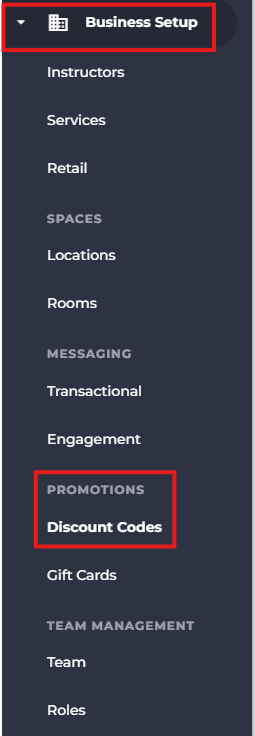
- Click on 'Business Setup' in the side menu then under Promotions access Discount Codes.
- Click on the 'Add Discount Codes' button towards toward the top right.

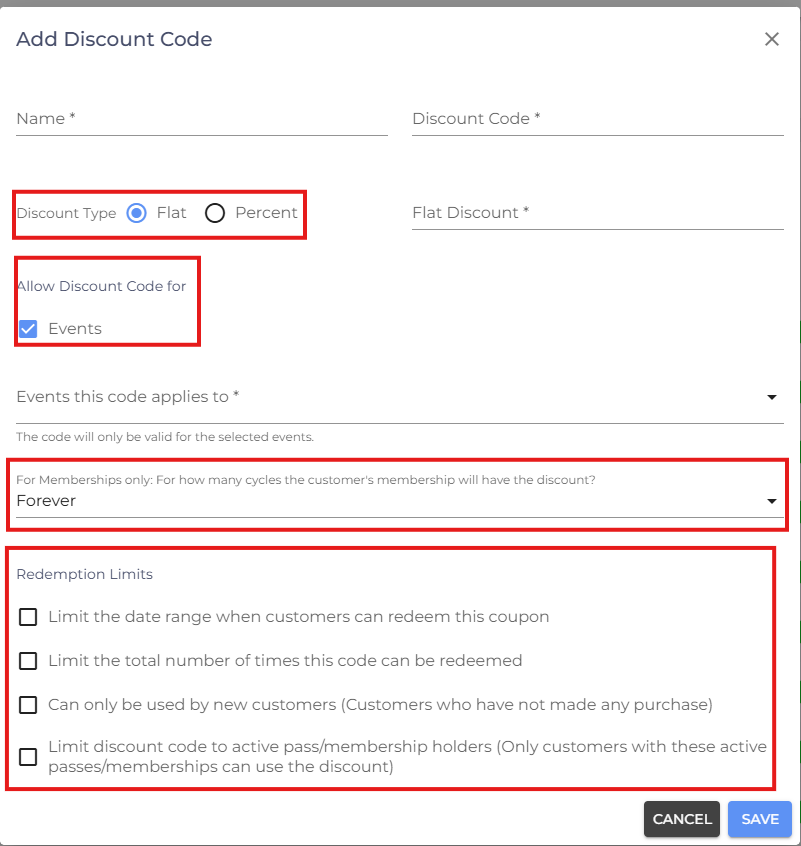
- Fill in correct details in the required fields and select the correct "Discount Type".
- Enable the 'Redemption Limits' you want and click 'Submit' to save the Discount Code.
Events
Enable this option if the discount code should be available for event bookings.
Membership Discount Duration
For Memberships only: For how many cycles the customer's membership will have the discount?
This setting controls how long the discount applies to recurring membership payments.
Forever
The discount continues to apply to all future renewal cycles until the membership ends or the discount balance/conditions are no longer valid.
Example:
A customer purchases a monthly membership using a 10% discount code. The 10% discount will automatically apply every month.
Limited Cycles
You can select a specific number of billing cycles for which the discount applies.
Example:
A 20% discount applied for the first 3 months will stop after the third renewal.
Redemption Limits
- Limit the date range when customers can redeem this coupon
This allows you to set a specific period during which customers can apply the discount code.
-
Limit the total number of times this code can be redeemed
This sets a maximum number of uses for the discount code.
-
Can only be used by new customers (Customers who have not made any purchase)
This restricts the discount code to customers who have never completed a purchase before.
-
Limit discount code to active pass/membership holders
This allows only customers with an active pass or membership to use the discount code.
- If you are facing any difficulties, get in touch with us via help.studiogrowth.com and we'll help you to get up and running in no time.