
Creating Membership Pass
A Membership Pass provides customers with ongoing access to your studio's services for a specified period. Depending on how it's configured, a membership can include limited or unlimited credits, allowing members to book eligible classes and services throughout the membership duration.
- From the side menu, navigate to Passes.

- Click Add New Pass.

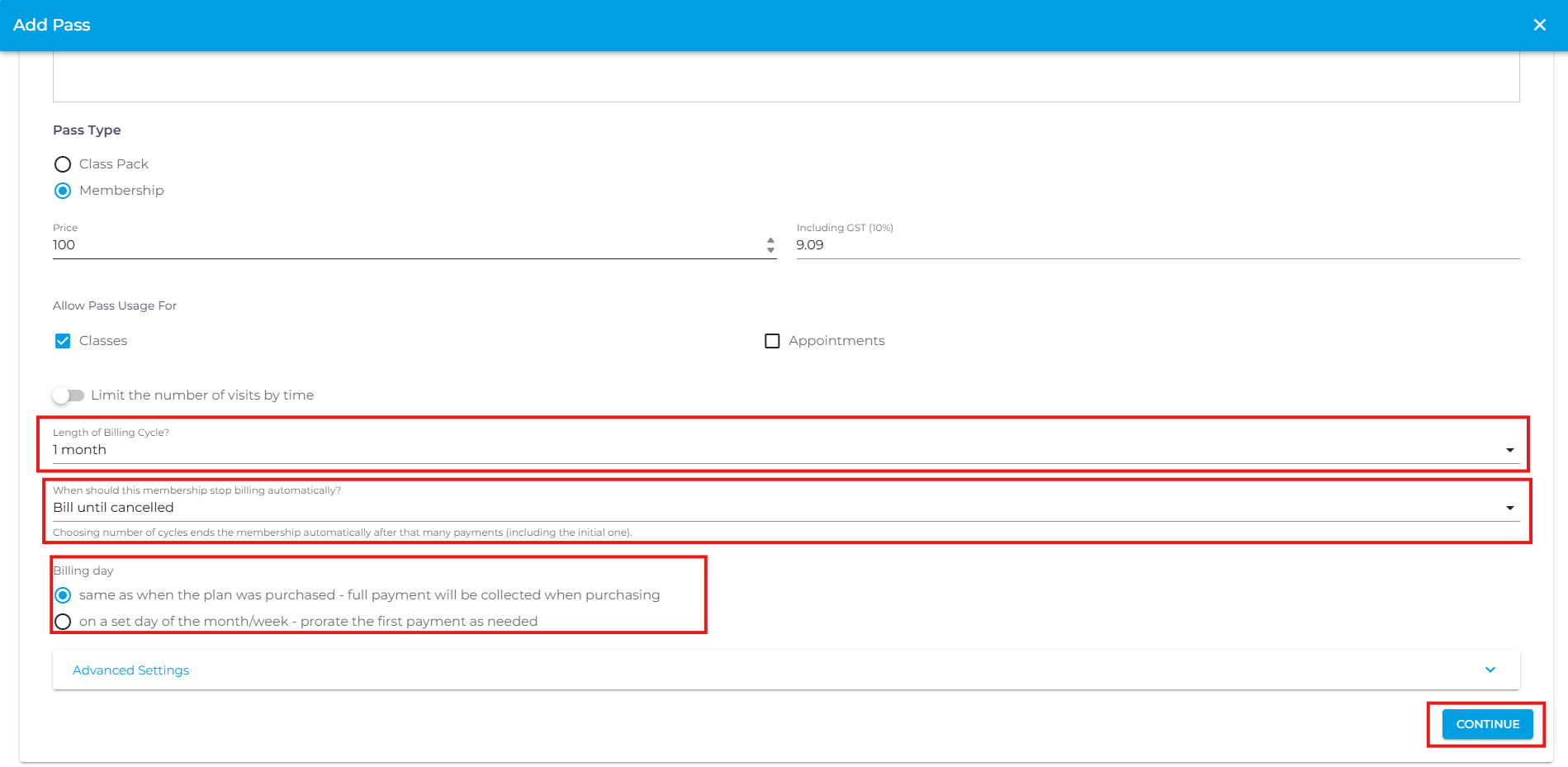
- Under Pass Type select Membership.

- Enter the required pass details, such as the pass name, price, validity, and any other applicable settings.
- Length of Billing Cycle – Defines how often the customer is billed for the membership (e.g., weekly, monthly, or yearly).
- When Should This Membership Stop Billing Automatically? – Choose when the membership should stop billing. Select Bill until cancelled to continue billing until the membership is cancelled, or choose a specific number of billing cycles to automatically end the membership after the selected number of payments, including the initial payment.
- Same as When the Plan Was Purchased – Full Payment Will Be Collected When Purchasing – The customer's first payment is collected in full at the time of purchase. Future recurring payments are then charged on the same day of the month or week that the membership was originally purchased.
- On a Set Day of the Month/Week – Prorate the First Payment as Needed – The customer's recurring payments are charged on a specific day of the month or week that you choose. The initial payment is automatically adjusted (prorated) based on the time remaining until the first scheduled billing date.
- Scroll down and click Continue.
- Choose whether the membership includes Limited or Unlimited Credit
Limited Credits – Members receive a fixed number of credits.
Unlimited Credits – Members can attend classes without a credit limit during the membership period.
- If you'd like members to bring guests, enable Allow Guest Booking.
You can also assign a separate number of guest credits for guest bookings.
- (Optional) Configure Limit Number of Visits by Service to control how many times the membership can be used for specific services.
- Review all the membership settings, then click Submitto create the membership pass.

Note: If the class you want to assign isn't listed, create the class first, then edit the membership pass to assign it.
- If you are facing any difficulties, get in touch with us via help.studiogrowth.com and we'll help you to get up and running in no time.