
Create a Discount Code for an Event
Event discount codes allow you to offer fixed or percentage-based discounts on event ticket purchases. You can also configure redemption limits and assign the discount code to specific events.
- From the side menu, navigate to Business Setup.
- Select Discount Codes under Promotions.

- Click Add Discount Code.

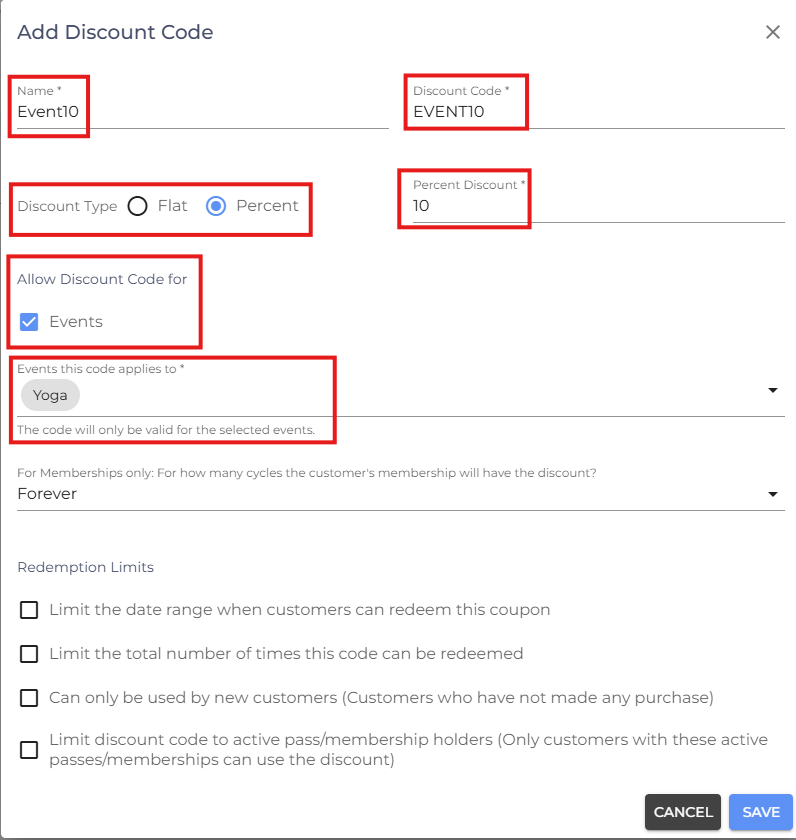
- Enter a Name for the discount code.
- Enter the Discount Code customers will use during checkout.
Select the Discount Type:
- Flat – Applies a fixed discount amount.
- Percent – Applies a percentage-based discount.
- Enter the discount amount or percentage.
- Under Allow Discount Code For, enable Events.
Important: An event discount code only works for the event(s) it has been assigned to. Customers can only redeem the discount code when purchasing tickets for those assigned events.
Configure Redemption Limits
Configure any restrictions for the discount code:
- Limit the Date Range When Customers Can Redeem This Coupon – Restrict the discount code so it can only be redeemed within a specified date range.
- Limit the Total Number of Times This Code Can Be Redeemed – Set the maximum number of times the discount code can be redeemed.
- Can Only Be Used by New Customers – Restrict the discount code to customers who have never completed a purchase.
- Click Save.
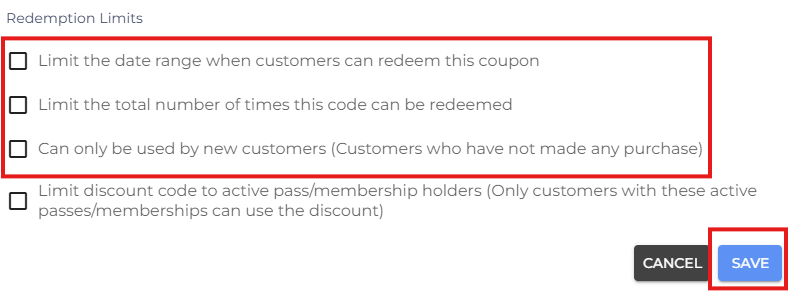
Note: After clicking Save, the Assign Pass window will appear. Assign a Class Pack or Membership only if you want the discount code to apply to passes as well. If the discount code is intended only for Events, you can skip this step. If you assign both a pass and an event, the discount code can be used for both the assigned pass and the assigned event.
Related Article: See Create an Event for instructions on creating and managing events.
- If you are facing any difficulties, get in touch with us via help.studiogrowth.com and we'll help you to get up and running in no time.